Legal AI for UK law firms
Drafts and first reads that cite the section they rely on.
Counsel AI drafts letters of claim, weighs Part 36 offers, reports on leases and reviews contracts for litigation, conveyancing and commercial teams. Statutory points are cited to the section with the core sources linked to legislation.gov.uk, every quoted clause is checked against your document, and anything uncertain is marked for you to verify.
Paste text insteadStart the 14-day trial, no card
Counsel AI keeps no copy. The text is analysed through Anthropic’s API, which deletes it within 30 days and never trains on it. Use a document you are cleared to share, or a redacted copy.
tenancy-agreement.pdf · page 3
4.2The Tenant shall pay the Rent on the first day of each month by standing order.
4.3The Landlord shall keep in repair the structure and exterior of the Property, including drains, gutters and external pipes.
4.4The Tenant shall report any disrepair to the Landlord in writing as soon as reasonably practicable.
Quoted in the draft and found in your document
Draft · findings
Letter of claim: grounds
The landlord’s covenant to keep the structure and exterior in repair is implied into the tenancy.
Landlord and Tenant Act 1985, s.11(1)(a)The tenancy was granted after 20 March 2019, so the fitness-for-habitation covenant applies.
Landlord and Tenant Act 1985, s.9AThe documents do not say when the landlord received the tenant’s first complaint. Confirm the date before relying on notice.
[verify]Not stated in the documentsHow every answer is grounded
You can check every point it makes.
A draft is only useful if you can verify it quickly. Counsel AI shows where each point comes from, and says plainly when it isn’t sure.
Pinpoint citations
Cited to the section, sourced from legislation.gov.uk
Statutory points are cited to the section. The legislation each workflow is built on links straight to the official text, so checking it is a click, not a search.
[verify]
Uncertainty is marked, not hidden
Where the documents don’t settle a point, the draft tags it [verify] and tells you what to confirm, instead of filling the gap.
Quote check
Every quoted clause is matched to your document
Each quotation in a result is checked against the file you uploaded. If the words aren’t there, the result says so.
Re-checked daily
Sources checked for amendments every day
The legislation behind each workflow is re-checked against legislation.gov.uk every day, and the Sources page shows when it last ran.
See it work
An unedited lease report, exactly as it came back.
A 1990 flat lease, written for testing with seven problems planted in it, run through the lease-report workflow on 14 October 2026. Read the whole output below, unedited. The film shows the 2 October 2026 run of the same lease; nothing in it is retyped: the findings, citations and counts are that stored output.
- 7 / 7planted problems found: marriage value below 80 years, doubling ground rent, a discretionary service charge, an absolute bar on assignment, the tenant repairing the structure, forfeiture without demand, no pets
- 10 / 10quotations found word for word in the lease
- 21points it asked you to confirm rather than guess, each tagged [verify]
- 14statutory provisions it cited linked to their legislation.gov.uk page, each checked to exist
Full workflow · sample PDF
Leasehold lease report
A 1990 flat lease with seven planted problems. Buyer-ready summary, ten-part report, enquiries for the seller’s solicitor, sources.
- 7 of 7 planted problems found
- 10 of 10 quotes matched
- 14 statutory provisions linked
Free check · no account · sample PDF
NDA first read
A seven-clause mutual NDA. Green, yellow or red, the risk flags with the clause quoted, and what a full review would add.
- Classified red
- Clause quoted for each flag
- No copy kept
Workflows
20+ workflows for the work that fills a practice’s week.
Each one is built for a specific piece of work, with its own checks and its own sources. Pick the workflow, add the documents, review the draft.
Litigation and disputes
Pre-action steps, offers, witness evidence and the chronology, drafted for you to settle.
- Part 36 offer evaluationThe offer read against the claim, with the costs consequences set out.
- Pre-action protocol checkWhat the protocol requires, what has been done, what is missing.
- Witness statement first draftA first draft in the witness’s own order of events, for you to settle.
- Chronology builderA dated chronology across every document in the matter.
- Subpoena and disclosure triageAn order or third-party request checked for validity, scope, deadline and next steps.
- Housing disrepair letter of claimA first draft from the tenant’s account and documents, for you to settle.
- FOS complaint draftA complaint to the Financial Ombudsman, built from the file.
- Lender final-response analysisWhat the lender conceded, what it refused, and the response deadlines.
Conveyancing
The long leasehold read that holds up a residential file.
- Leasehold lease reportTerm, ground rent, service charge, alterations, alienation and the points to raise.
Commercial
The contracts that arrive every week, read against your own positions.
- NDA triageGreen, yellow or red, with the clauses that decided it.
- MSA and SaaS agreement reviewClause-by-clause findings with suggested redlines.
- Termination clause reviewTermination rights, notice mechanics, survival and exit exposure.
- IP clause reviewOwnership, assignment, licences, feedback and moral rights.
- Open-source licence reviewCopyleft and attribution obligations, and the distribution risk.
- Compliance checkA proposed action or campaign screened for the rules, approvals and risk areas.
- Playbook redliningYour firm’s fallback positions applied to the counterparty’s draft.
- Multi-document comparisonWhat changed between versions, or how several agreements differ.
Privacy and data protection
UK GDPR work where the statutory text is the point.
- DPA review to Article 28Each Article 28(3) requirement checked against the processor terms.
- DSAR triage and responseScope, deadlines, exemptions to consider, and a response draft.
- DPIA draftA structured impact assessment from a description of the processing.
- Privacy use-case triageDoes a proposed data use need a DPIA, a DPA, or a green light?
Employment
Exits and hires, screened before they become claims.
- Termination risk screenProcess followed, protected characteristics, and the exposure.
- Offer and contract reviewRestrictive covenants, notice and the terms worth a second look.
Where it works
In the browser, in Word, and where the document already is.
Web app
Every workflow, your playbooks, review history and the audit log. Upload PDF or Word files, ask follow-up questions, export to Word.
Start the 14-day trialWord add-in
Review the agreement you already have open. Findings and suggested redlines appear in the task pane beside the clause they concern.
Install in WordChrome extension
Check terms where you find them: a supplier’s website, a portal, an email attachment. Select the text and run the workflow in place.
Add to Chrome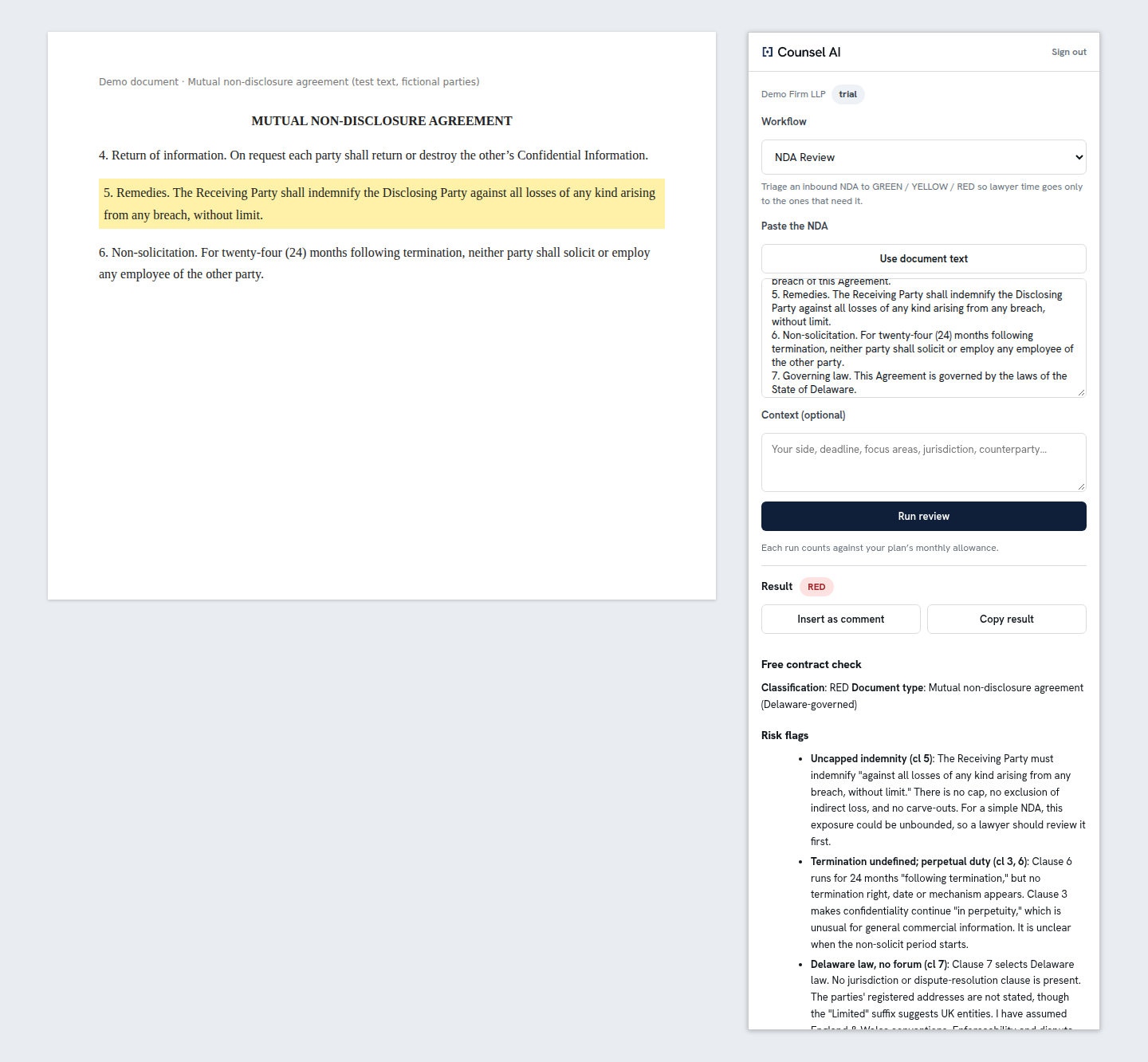
Free calculators
Lease extension and marriage value, the Part 36 relevant period and limitation dates, each with its sources.
Open the calculatorsLegal sources, checked daily
Every source the workflows rely on, each re-checked against legislation.gov.uk for amendments.
See the sourcesAsk the document
Follow-up questions answered from the document itself, with the quote check run on the answer. Available in every workflow.
See the workflowsChronology to calendar
Dates pulled from a matter’s documents into a chronology you can export as an .ics calendar file.
Chronology builderFor your COLP
Answers for whoever signs off your firm’s use of AI.
The Law Society’s generative AI checklist, item by item, and how Counsel AI answers each. Your regulator expects you to supervise the tools you use; these are the controls that let you.
Neither body has reviewed or endorsed Counsel AI.
- Vendor data and security
- The application, its database and uploaded documents are held in Germany (Hetzner). Analysis runs on Anthropic’s Claude API in the United States, under the UK International Data Transfer Addendum. The DPA and sub-processor list are published.
- Training a third party’s model?
- No. Documents and results are not used to train models. Anthropic keeps API inputs for up to 30 days for safety checks, then deletes them. Uploaded documents are purged from Counsel AI after 90 days by default, configurable per organisation. Analysis results, which quote the document, stay in your review history by default; an organisation admin can set an automatic deletion period for them, anyone can delete their own analyses in the app, and we delete them, or the whole account, on request.
- Appropriate input data
- Optional anonymisation removes personal data from a document before it is analysed.
- Record inputs and outputs
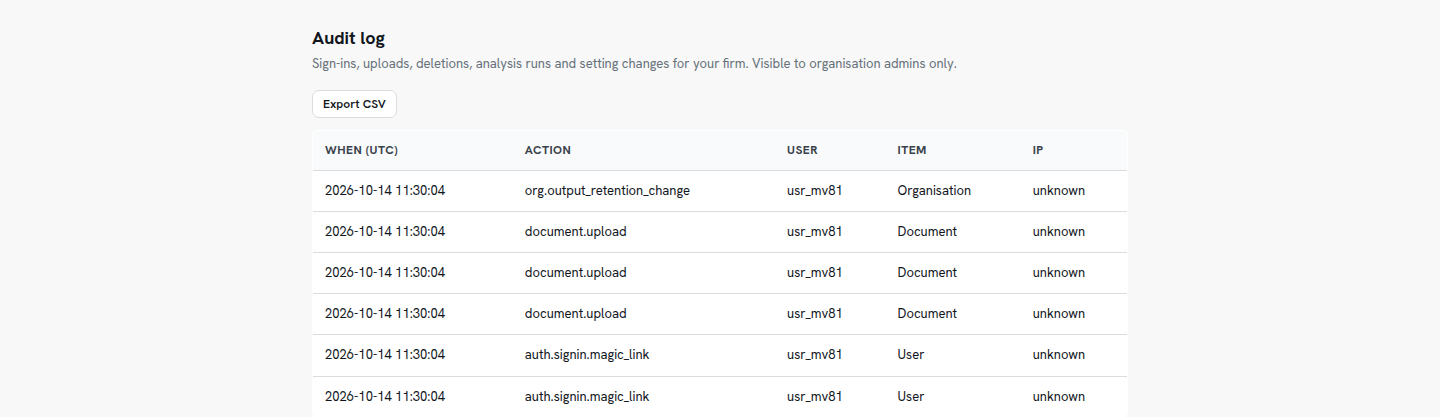
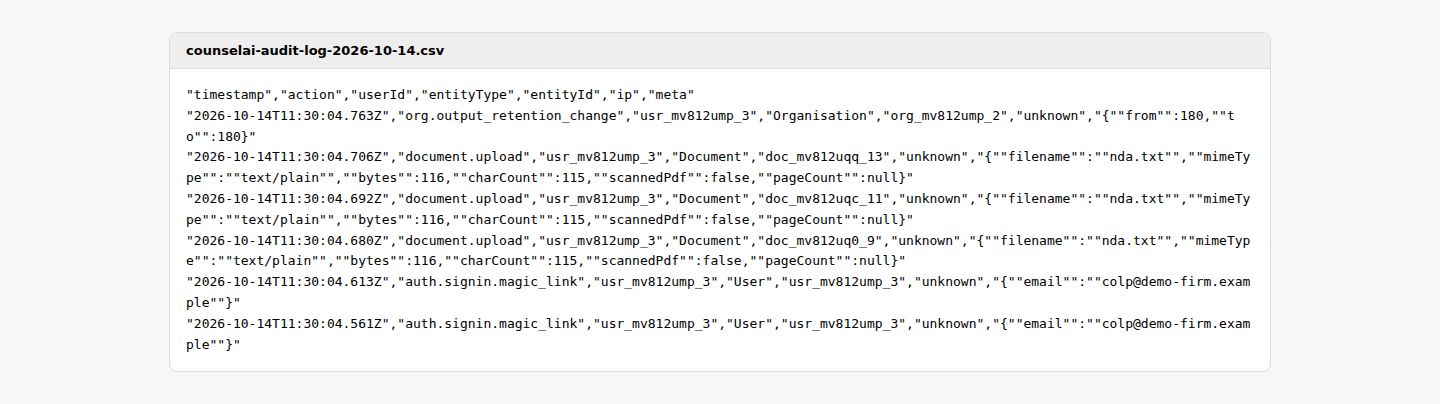
- Every analysis is written to an audit log: who ran which workflow on which document, and when. Administrators export it to CSV on every plan; results stay in review history.
- Check outputs for accuracy
- Statutory points are cited to the section and the legislation each workflow is built on links to legislation.gov.uk. Quotations are matched against your document, open points are tagged [verify], and the legislation is re-checked for amendments daily.
- Liability and advice
- Every result is a draft for solicitor review and says so. Counsel AI does not give legal advice; confirm your own PI cover for AI-assisted work.
- Sign-in
- Passkeys (Touch ID, Face ID, Windows Hello) or a one-time emailed link. There are no passwords to leak.
- Read the terms
- Data processing agreement · Sub-processors · Privacy notice

Pricing
Start without a subscription. Subscribe when it earns its place.
Prices in GBP, billed monthly. No VAT is charged: Jadthena Limited is not VAT-registered. Every plan starts with 14 days free and no card.
For one fee earner
Solo
£79/month
- 1 user
- 30 analyses a month
- Every workflow
- Word add-in and Chrome extension
- Audit-log export
No card for the trial. Subscribe now at £79/mo, cancel any time.
For a team or department
Team
£299/month
- Everything in Solo, plus
- 5 users
- Extra users £49/month each
- 200 analyses a month
- Playbooks
- Multi-document comparison
No card for the trial. Subscribe now at £299/mo, cancel any time.
For the whole firm
Business
£599/month
- Everything in Team, plus
- 20 users
- Unlimited analyses
- Priority support
No card for the trial. Subscribe now at £599/mo, cancel any time.
14 days free, no card. Choose a plan when the trial ends.Subscribing now? Pay by card, Apple Pay or Google Pay; your account is created at checkout.
Is Counsel AI giving legal advice?
No. It produces drafts and first reads for review by a qualified solicitor. It does not give legal advice or create a solicitor–client relationship, and every result says so.
Where do the citations come from?
Statutory points are cited to the section. The legislation each workflow is built on links to legislation.gov.uk and is re-checked there every day for amendments. Where the tool is not certain, it marks the point [verify] rather than guessing.
What is the quote check?
Every clause Counsel AI quotes back to you is matched against the document you uploaded. If a quotation does not appear in your document, the result says so.
Are our documents used to train models?
No. Documents are processed to produce your result and are never used for training. Anthropic, which runs the analysis, deletes API inputs within 30 days. You can switch on anonymisation so personal data is removed before analysis.
Where is our data held, and for how long?
The application, its database and uploaded documents are held in Germany. Analysis runs on Anthropic’s Claude API in the United States, which keeps inputs for up to 30 days for safety checks and does not train on them. Uploaded documents are purged after 90 days by default, configurable per organisation. Analysis results, which quote the document, stay in your review history by default; an organisation admin can set an automatic deletion period for them, anyone can delete their own analyses in the app, and we delete them, or the whole account, on request.
Can we show how AI was used on a file?
Yes. Every analysis is written to an audit log, which your administrators can export to CSV — a record for supervising the use of AI in the firm.
How do the trial and payments work?
14 days free with no card: start from the sign-in page and choose a plan when it ends. Or buy ten full reviews for £39 as a one-off, with no subscription; those credits never expire. No VAT is charged, because Jadthena Limited is not VAT-registered.
Who is behind Counsel AI?
Counsel AI is built and run by Jadthena Limited, a company registered in England and Wales (no. 16232930) whose director is Andrew (Andy) Gannon. Jadthena is registered with the Information Commissioner’s Office as a data controller (ZC251636). It is a software provider, not a law firm, and it is not regulated by the SRA.
Put a real document through it this afternoon.
Run a free check with no account, or start a 14-day trial and use every workflow on your own files.